


Feature
Unified Quality Checks
We will interview your company's internal rules and QC inspection items to provide optimally configured check processing. This enables unified quality checks on leaf files across your company, even without prior knowledge of eCTD standards or internal rules.
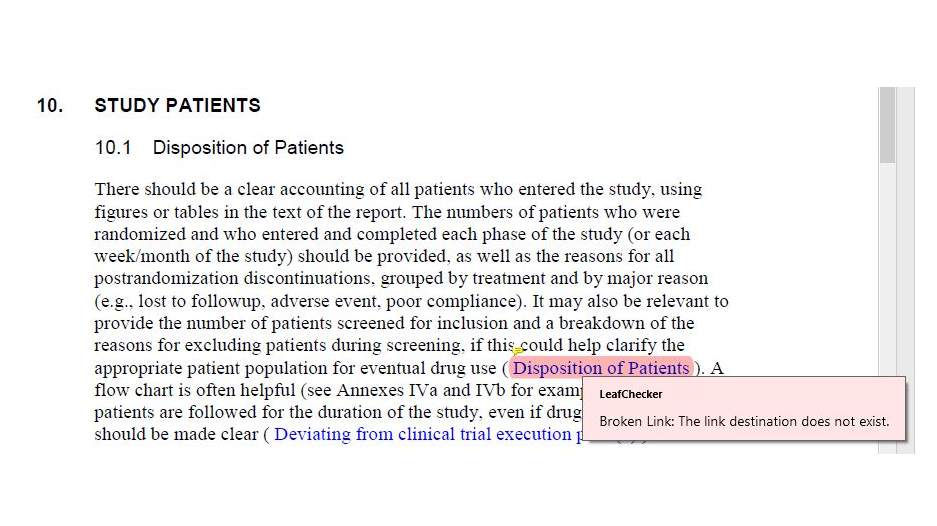
LeafChecker checks for compliance with standards
Checks whether the created leaf file complies with eCTD specifications.
We provide check rules for eCTDv3.2.2 and eCTDv4.0.
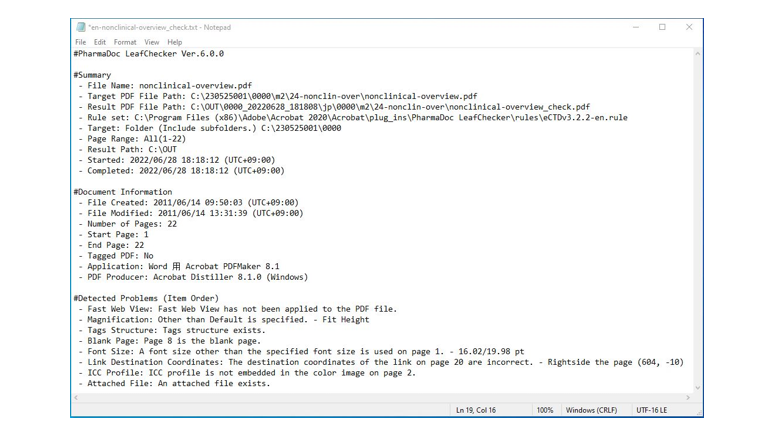
Gateway Application Check
We will check whether the created leaf file has any issues when applying for the Gateway.
- Does not contain JavaScript
- Bookmarklet string is not too long
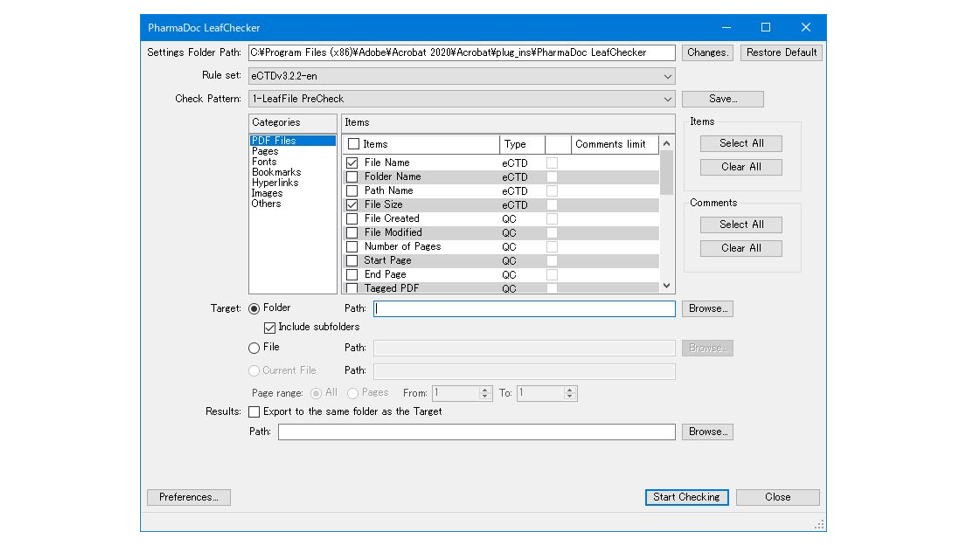
Check All Leaf Files
Simply specify a folder to check all leaf files within it. You can also specify individual files or the current file for checking.
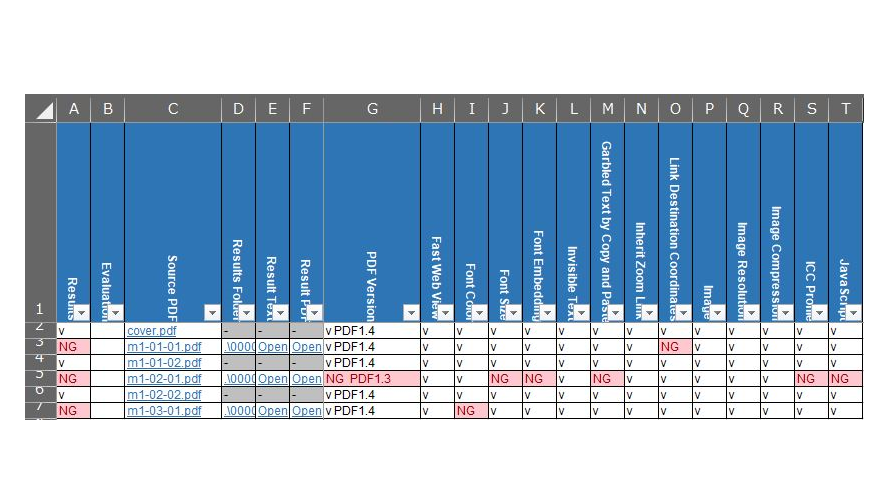
List of Check Results
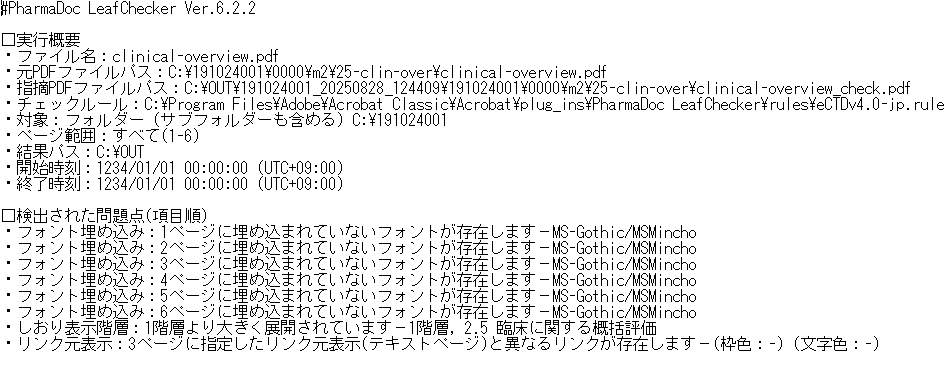
The check results can be reviewed in a summary report, listing which files encountered issues during which checks. For leaf files with issues, you can open the issue PDF and issue text directly from the summary report via links to verify the problem areas. Annotations are added to the problem areas, making it easy to pinpoint them.
Available Languages
- The display language can be selected from Japanese, English, and Simplified Chinese.
- The output language (check results) can be output simultaneously in multiple languages (Japanese, English, and Simplified Chinese). This facilitates providing correction instructions in a language the author understands.
Available Editions
LeafChecker is available in the following editions:
- Desktop App Edition
- Adobe Acrobat plug-in Edition
PharmaDoc LeafChecker Overview
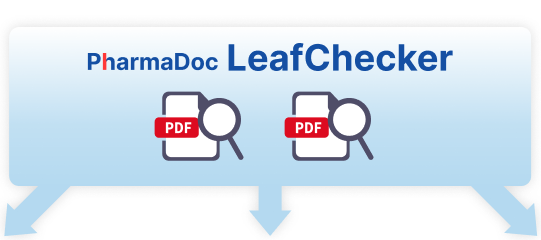
- Multiple leaf files within the folder
- 1 Leaf File (Page Specified)
Summary Report
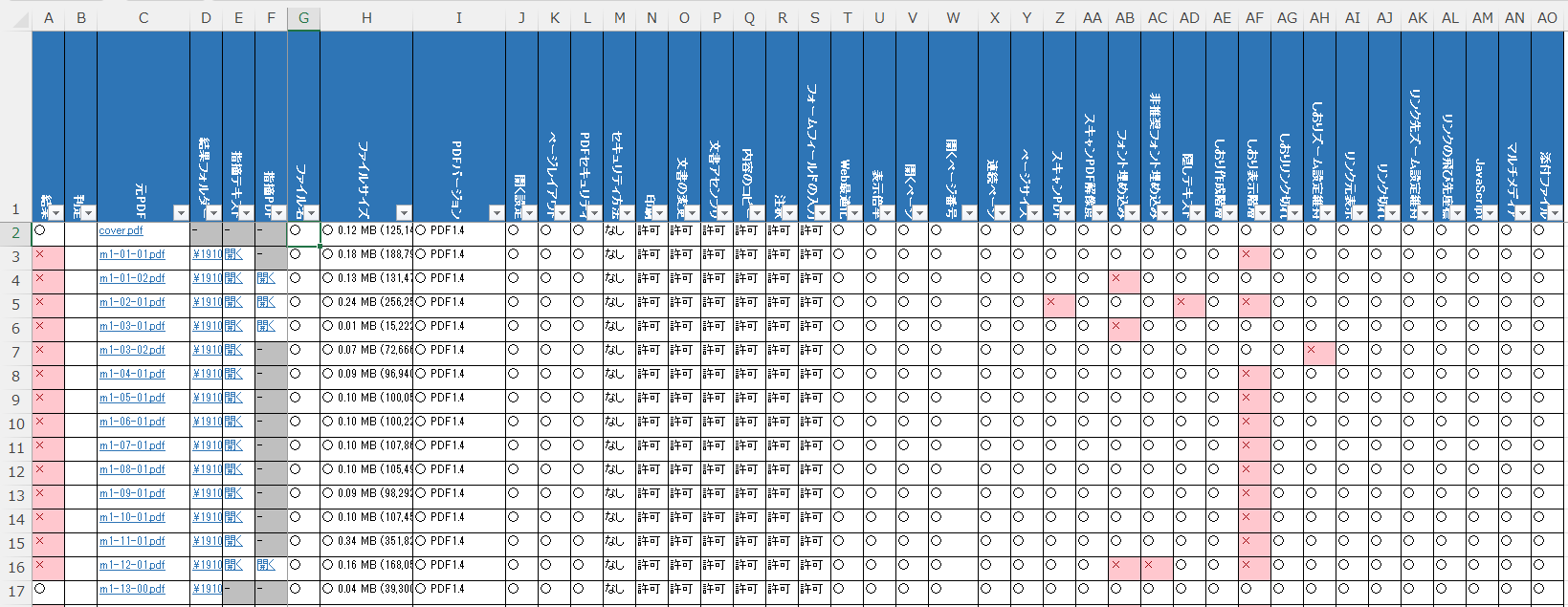
Result PDF
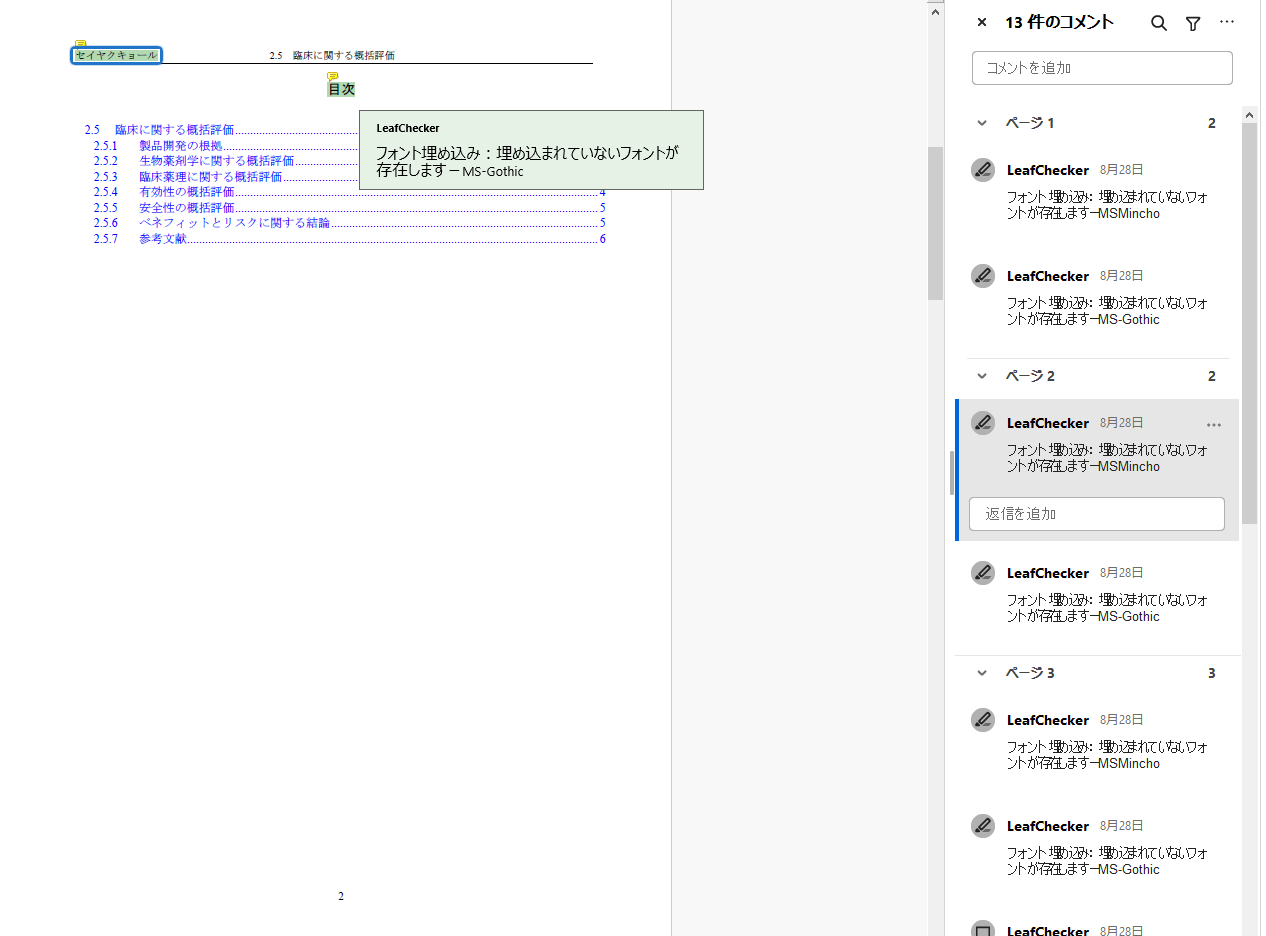
Result Text
PharmaDoc LeafChecker Check Items
PDF Files
- File Name
- Folder Name
- Path Name
- File Size
- File Created
- File Modified
- Number of Pages
- Start Page
- End Page
- Tagged PDF
- PDF Version*
- PDF Version Header
- PDF Version Difference
- Open Settings
- Page Layout
- Digital Sign
- PDF Security
- Fast Web View
- Property Description
- Display Properties
- Application
- PDF Producer
- Magnification
- Open to Page
- Open to Page Number
- Continuous Page
- Tags Structure
*PDF/A validation is also available.
Pages
- Page Size
- Rotate Page
- Margin
- Scanned Page
- Scanned Page Resolution
- Blank Page
- Object Outside Page
Fonts
- Font Used
- Font Color
- Font Size
- Font Embedding
- Non-recommended Font Embedding
- Invisible Text
- Garbled Text by Copy and Paste
Images
- Image
- Image Resolution
- Image Compression
- ICC Profile
Bookmarks
- Created Level Bookmark
- Expanded Level Bookmark
- Broken Bookmark Link
- Inherit Zoom Bookmark
- Bookmark Destination Coordinates
- Bookmark String Length
- Bookmark Count
- Internal Bookmark Count
- External Bookmark Count
- Launch Bookmark Count
Hyperlinks
- Link Appearance
- Broken Link
- Inherit Zoom Link
- Link Destination Coordinates
- Link Count
- Internal Link Count
- External Link Count
- Launch Link Count
- Error String
- Web Link
Others
- JavaScript
- JPEG2000 Compression
- Comments
- Forms
- Multimedia
- Attached File
Developer Interviews

Development immediately after joining the company, with various documents in hand, I was frantically trying to implement.
Read More
What were you involved in the development?
I have been responsible for the design and implementation of PharmaDoc LeafChecker since the product was completed, and continue to improve existing features on an irregular basis.
What were some of the challenges in development?
When I was in charge of the project, I had just joined the company and did not have enough domain knowledge about pharmaceuticals, so I was struggling to implement the project with various materials in my hand.
I also had a hard time learning the implementation because I had no experience with the language we were using for development.
However, we were able to consider and propose specifications, which were immediately reflected in the project.
I believe this sense of speed is our strength.
What would you like to see happen to this product in the future?
As a stand-alone product, it may be difficult to expand its adoption, but LeafChecker is running behind PharmaDoc SRFlow, another product, and we hope it will continue to be used by many customers in the form of cloud computing.
Customer Cases
We would like to introduce a customer case study and how it was handled using LeafChecker.
Customer Case 01
Existence of too long bookmark string
Read More
summary
An error occurred on the screen for registering an upload file (PDF) at Gateway, and the file could not be registered. PMDA explained that the error may have occurred because communication was blocked due to what appeared to be a security vulnerability.
rationale
According to the customer's survey, if the length of the bookmark exceeds 561 full-width characters / 1022 half-width characters, it will be caught by the PMDA's security check. The PMDA's response was that if the number of characters exceeds about 500 in double-byte characters, it is likely to be caught in the check.
How to deal with it
Check the number of bookmark characters in LeafChecker. The indicated bookmarks should be modified in Acrobat's bookmark pane so that the bookmark character string is within 500 characters. Please contact Furuya as the check rules of LeafChecker need to be changed (set the upper limit).
Customer Case 02
Existence of JPEG2000 compressed images
Read More
summary
During Gateway submission, transmission is interrupted at a specific leaf file, preventing successful completion.
PMDA explained that the PDF file may be detected as a security vulnerability due to containing the null character “0x00 (NUL)”.
rationale
The problematic leaf file contained JPEG2000 compressed images.
How to deal with it
Perform checks using LeafChecker's “JPEG2000 compression”.
To make corrections after issues are flagged, select the “File > Save as Other Formats > Optimized PDF” menu in Acrobat.
In the “Optimize PDF” dialog, under the ‘Images’ options, setting both “Color images” and “Grayscale images” to “ZIP compression” allows you to recompress JPEG2000 compressed images into ZIP format.
*Please use Acrobat 2017 (2017.011.30068) or later versions.
Customer Case 03
Existence of JPEG2000 compressed images
Read More
summary
Since JPEG2000 compressed images were present,
converting them to ZIP compression using the preflight feature resulted in pages where text was deleted (the entire text area became blank).
When I applied “ZIP compression” under “PDF optimization,” the text in the body of pages unrelated to images disappeared.
rationale
There was an issue with Acrobat's “Optimize PDF” feature where text on pages unrelated to images would turn white and become invisible.
This issue has been fixed in Acrobat 2017 (version 2017.011.30068) and later versions.
How to deal with it
※This is the same as Customer Case (2).
Customer Case 04
JavaScript present
Read More
summary
When applying for Gateway, transmission is interrupted for specific leaf files, preventing successful transmission.
PMDA explained that the files may contain scripts (such as JavaScript) or images (such as manipulated JPEG2000 format images) that appear to be vulnerabilities. For security reasons, they may be unable to accept these files, resulting in an error.
rationale
JPEG2000 compressed images were present.
JavaScript was not included.
How to deal with it
※The procedure for handling JPEG2000 compressed images is the same as in Customer Case (2).
※Please handle JavaScript as follows:
LeafChecker performs checks using “JavaScript”.
After receiving feedback, you can make corrections using one of the following two methods:
– eCTDSupporters: Select “Remove JavaScripts” under “Remove Unnecessary Information” in the “eCTD Batch Configuration Tool” and execute.
– Preflight: Execute both fix-ups: “Discard All JavaScript Actions” and “Discard All JavaScripts” to remove JavaScript.
The order of executing the fix-ups does not matter, but be sure to execute both fix-ups.
If you have any questions, please contact us using the Inquiry Form.
Contact us for product introduction and consultation!
Please feel free to contact us.
System Requirements
| version | operating environment |
|---|---|
| PharmaDoc LeafChecker 6.2.2 (Desktop App Edition) | Microsoft Windows 10 (64bit), Windows 11 |
| Adobe PDF Library 18.0.4 | |
| Microsoft Excel 2016, 2019, 2021, 2024, Microsoft 365 | |
| Microsoft .NET Framework 4.8 | |
| Microsoft VisualC++ 2015-2022 redistribution package (x64) | |
| PharmaDoc LeafChecker 6.2.2 (Adobe Acrobat plug-in Edition) | Microsoft Windows 10, Windows 11 |
| Adobe Acrobat 2020 (32bit), Pro 2024 (64bit), DC Continuous (32bit/64bit) | |
| Microsoft Excel 2016, 2019, 2021, 2024, Microsoft 365 | |
| Microsoft .NET Framework 4.8 | |
| Microsoft VisualC++ 2015-2022 redistribution package(x86/x64) |