


Feature
- Batch conversion of Acrobat highlight annotations and rectangular annotations to black-out annotations.
- The masking operation can be easily carried out by using a dedicated marking tool based on the authorities' notification.
- The creation of masking drafts (blind PDFs, masking list drafts) and published documents (masking PDFs), which used to be a complicated process, can now be easily created with a single click.
- The system automatically checks whether any text remains under the masking area and pinpoints areas that have not been erased.
Current masking workflow
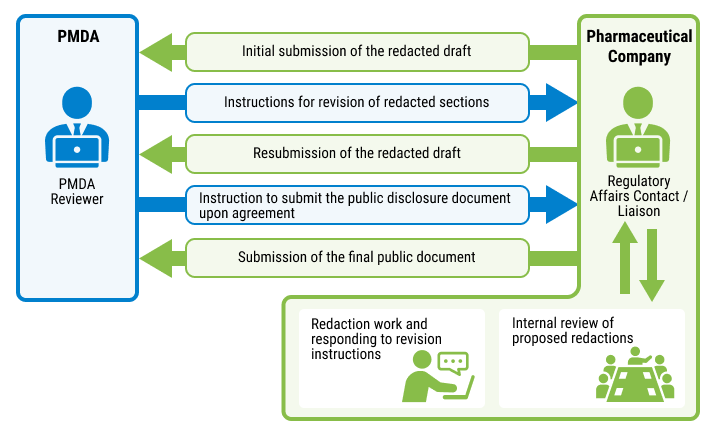
Ability to Create Masking Plans
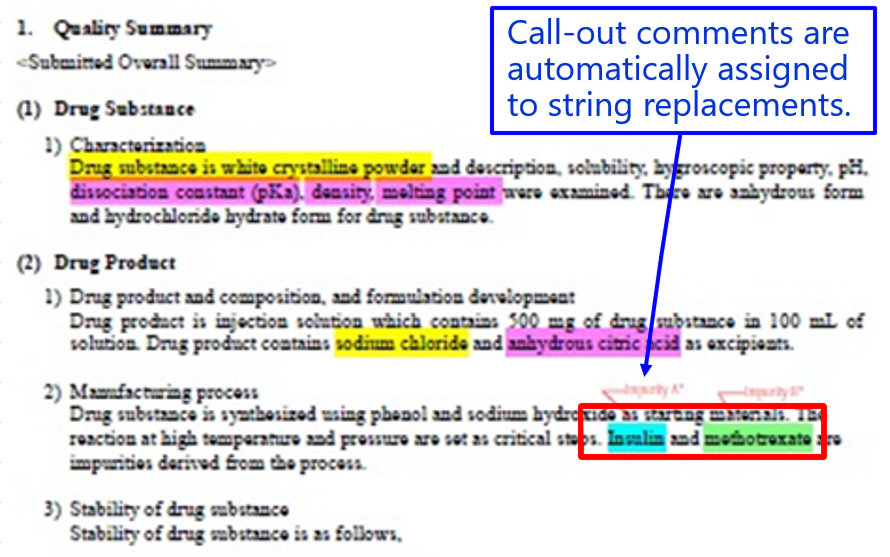
Invisible PDF
- Create a visible PDF to be submitted to the authorities at the touch of a button.
- Highlight colors can be individually specified for black-out and text replacement.
- Re-submission is now supported.
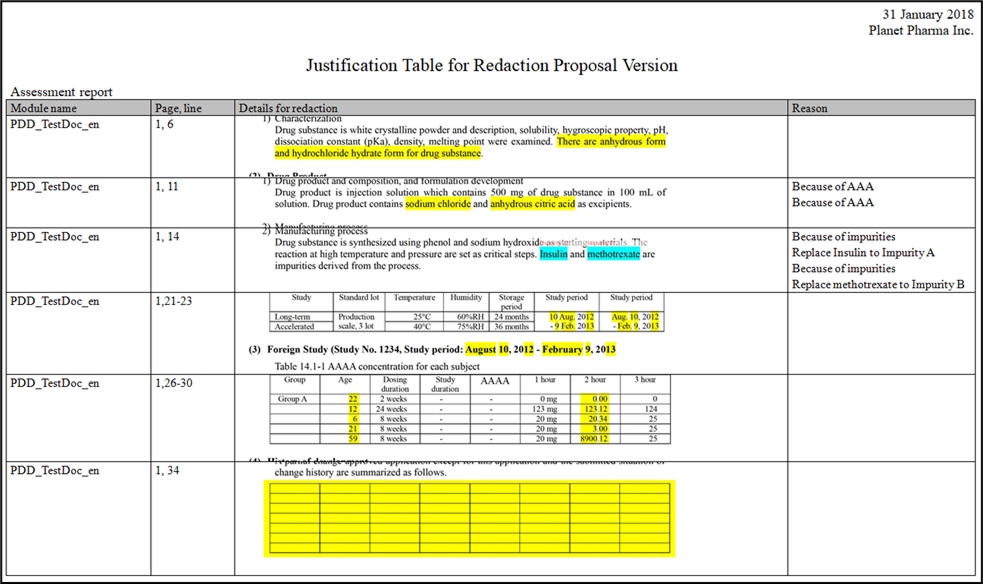
Masking List (draft)
- Module name (file name) can be output to support separate writing.
- Pages, lines, and reasons are automatically output.
- Screen captures of multiple lines together at page width are automatically output.
- When resubmitting, the changes made this time will be automatically double underlined, and all other changes will be single underlined.
Ability to Create Publicly Available Materials
Creating Masking PDFs
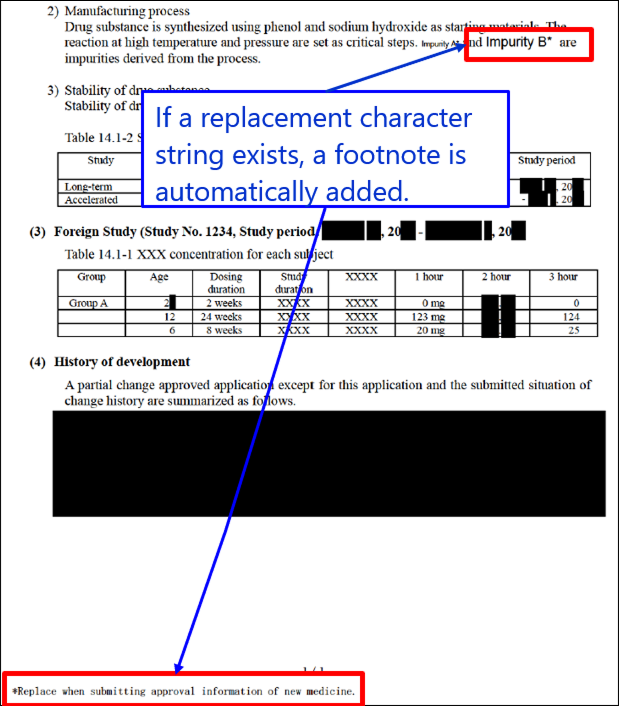
Create a masked PDF file that is publicly available material. When creating the PDF, the following processes are performed at the same time.
(Automatically add "*Substitute when providing new drug approval information" to footnotes on pages with substitution strings.)
Example of a Masking PDF to be Created
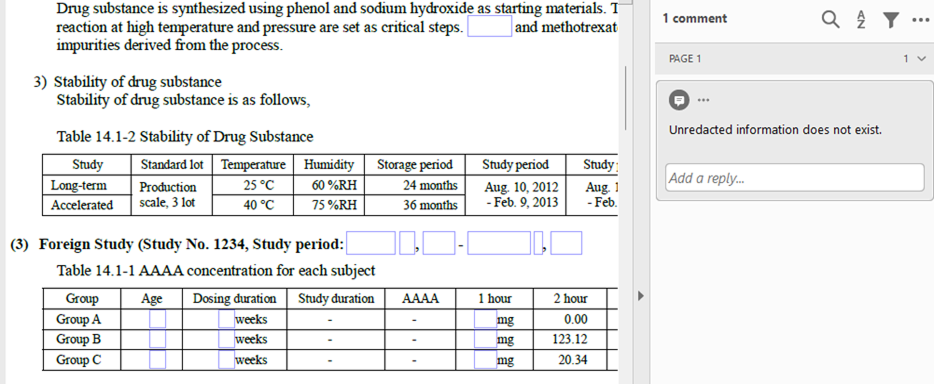
Confirmation PDF
In the workflow without Redact, the masking area was selected by mouse dragging and then copy-pasted into a text editor to see if the string was extracted.
Redact creates a confirmation PDF to check and point out any masking omissions.
Masking areas are indicated with blue frames, and areas with omissions are indicated with red frames as annotations.
Masking omissions are annotated on the first page.
Developer Interviews

We are always mindful of how we can reduce even one task for our customers!
Read More
What were you involved in the development?
This is a UI/logic maintenance for a function that blackens (masks) important information in PDFs. I was put in charge of this after the product was completed and continue to improve the existing functionality on an irregular basis.
What did you focus on, what did you work particularly hard on, and what do you consider important in the development process?
We are conscious of how we can reduce the customer's workload even by one.
I think we received a lot of feedback from customers about the UI part.
Please tell us about an episode that left a lasting impression on you during the development process.
The customer gave me the opportunity to actually do the masking work myself.
I was surprised at the large amount of detailed work being done manually, and this experience was very helpful in subsequent maintenance. I think this is one of the strengths of this company, which is very close to its customers.
Contact us for product introduction and consultation!
Please feel free to contact us.
System Requirements
| version | operating environment |
|---|---|
| PharmaDoc Redact 4.4.0 | Windows 10, Windows 11 |
| Adobe Acrobat 2020 (32bit), Pro 2024 (64bit), DC Continuous (32bit/64bit) | |
| Microsoft Word 2016, 2019, 2021, 2024, Microsoft 365 | |
| Microsoft Excel 2016, 2019, 2021, 2024, Microsoft 365 | |
| Microsoft .NET Framework 4.8 | |
| Microsoft Visual C++ 2015-2022 redistribution package(x86/x64) | |
Introduction Movie
PharmaDoc Redact Presentation Video
※PharmaDoc Redact is a registered trademark of Planet Pharma Solutions, Inc.
※All company and product names mentioned herein are trademarks or registered trademarks of their respective companies.
※When using Adobe Acrobat, please use the software in accordance with Adobe Acrobat's End User License Agreement.